Upgrading our Oracle Database from 19c to 26ai
· 12 min read
Last weekend we moved our production database from Oracle Database 19c to Oracle AI Database 26ai.
It’s the database behind most of what we run at United Codes: our Oracle APEX apps, the APEX Office Print (AOP) cloud, licensing, customer portals, our blog.
I’m not a full-time DBA. About 20 years ago I was part of the DBA and experts team at Oracle, but today I mostly manage the team at United Codes. Still, I like to look after our own database, Oracle APEX and ORDS for some of our apps: I want to eat my own dog food and feel what our customers feel. For other environments we use Oracle Autonomous AI Database, which is 100% managed, so there I don’t have to think about any of this.
Short version: it works, it’s faster, and I think you should upgrade too. But not on a Friday afternoon. Plan it, test it, and expect a few surprises. Here are ours.
Why we upgraded now
19c served us well, but 26ai is where all the new things are. I already wrote about assertions in my World Cup betting app, and there’s a lot more: native JSON, vector search, SQL domains, bigfile tablespace shrink, and the SQL transpiler (more on that one below 😅).
The setup
- Source: 19.22, one CDB with the PDBs PRD (550 GB), DEV (142 GB) and TST (18 GB), plus two older PDBs with APEX 19.2 and 24.2 that stay on 19c for now.
- Target: a new CDB on 23.26.4 (that’s the 26ai release number), on the same server.
- Oracle APEX: 26.2, with ORDS in front. ORDS didn’t need any change, the service names stayed the same.
We moved the PDBs one by one: TST first, then DEV, then PRD, a few days apart. Every environment taught us something for the next one.
AutoUpgrade is a must
If you take one thing from this post: use AutoUpgrade. Download the latest autoupgrade.jar from My Oracle Support, don’t use the one that comes with the software. Mike Dietrich and his team are wonderful at blogging about AutoUpgrade and patching on Upgrade your Database - NOW!, it’s the best place to learn. Honestly, without their posts I wouldn’t do this myself.
We even used it to create the 26ai Oracle Home. AutoUpgrade downloads the software and the recommended patches from My Oracle Support itself (your MOS credentials go in its keystore) and installs a home with the latest Release Update already applied. This is the config we used:
global.global_log_dir=/u01/autoupgrade/logs_23264
global.keystore=/u01/autoupgrade/keystore
install1.patch=RECOMMENDED
install1.folder=/u01/software
install1.target_home=/u01/app/oracle/product/23.26.4/dbhome_1
install1.home_settings.oracle_base=/u01/app/oracle
install1.home_settings.edition=EE
install1.home_settings.inventory_location=/u01/app/oraInventory
install1.target_version=26
install1.download=yes
java -jar autoupgrade.jar -config oracle23264.cfg -patch -mode download
java -jar autoupgrade.jar -config oracle23264.cfg -patch -mode create_homeThis is also why patching isn’t a big deal anymore. And patching is so important these days: the recommendation now is to patch every month. With AutoUpgrade that’s the same few commands every time.
For the move itself we used unplug/plug with COPY: AutoUpgrade unplugs the PDB from the 19c CDB, copies the datafiles to a new location, plugs it into the 26ai CDB and upgrades it. This is our real config for PRD, and it’s all you need:
global.global_log_dir=/u01/autoupgrade/logs_prd_23264

# Source CDB (19c)
upg1.source_home=/u01/app/oracle/product/19.0.0/dbhome_1
upg1.sid=cdb1

# Target CDB (26ai 23.26.4)
upg1.target_home=/u01/app/oracle/product/23.26.4/dbhome_1
upg1.target_cdb=cdb2

# Only upgrade this PDB
upg1.pdbs=PRD

# Copy datafiles to new location (19c files stay on /u02 as fallback)
upg1.target_pdb_copy_option.PRD=file_name_convert=('/u02/oradata/CDB1/prd','/u04/oradata/CDB2/prd')

upg1.timezone_upg=yes
There are way more parameters you can set. For example upg1.run_dictionary_health=critical runs a health check of the dictionary before the upgrade. The easiest way to build a config is AutoUpgrade Composer. I also found that AI gets better and better at creating these configs, but Mike always says not to risk that.
Then always two steps:
java -jar autoupgrade.jar -config prd_to_cdb2_23264.cfg -mode analyze

java -jar autoupgrade.jar -config prd_to_cdb2_23264.cfg -mode deploy
Run analyze days before, not minutes before. It tells you exactly what will block you (in our case a recycle bin with thousands of objects, a component that gets removed, a maintenance window that overlapped with our upgrade window). Fix it, run analyze again, until it’s clean.
Why COPY and not upgrading in place? Because the 19c datafiles stay untouched. If something goes really wrong, you plug the old PDB back into 19c and you’re back where you started. It needs double the disk space and takes longer (we got about 125 MB/s, so the copy of PRD alone was over an hour), but for production I find that peace of mind worth it. We keep the 19c files for a week before we delete them.
Real timings:
| PDB | Size | Total | Of which the upgrade |
|---|---|---|---|
| TST | 18 GB | ~1h | 36 min |
| DEV | 142 GB | ~1h40 | 38 min |
| PRD | 550 GB | ~2h20 | with an interruption, see below |
Plus the time for your own checks. We put a maintenance page in front of the apps for the PRD move, on a Saturday night.
Clean up before you upgrade
The upgrade itself is mostly AutoUpgrade’s job. Most of our work was before it.
On 19c, PRD had 993 invalid objects. Old test packages, code against tables that were dropped years ago, an old APEX schema that was never removed. You don’t want to find out after the upgrade which invalid objects are “normal” and which ones the upgrade broke. So we cleaned up until PRD had 0 invalid objects, then upgraded.
What we did before the move:
- Dropped old Oracle APEX schemas (
APEX_240200and the like) that were still sitting there next to the current version. - Removed dead code and old versions of packages, with a backup of the DDL first.
- Purged the recycle bin.
- Gathered dictionary statistics.
- Fixed the code that we knew would break on 26ai (next section).
Tip: keep a list of your invalid objects per environment before the move. Then you compare after the move and you immediately see what’s new.
Code that breaks on 26ai
TST and DEV showed us what would break in PRD. These were the real ones:
DBMS_OBFUSCATION_TOOLKITis gone. It’s desupported since 21c, so coming from 19c this is the moment it hits you. We used it in some old license and password code. Rewriting toDBMS_CRYPTOis easy, getting the same output is not. For DES the default zero IV matched the old toolkit. For 3DES we needed the IV0123456789ABCDEF, otherwise not a single hash matched. We proved it on 19c first, with the old and the new function side by side on the real data, before we touched anything.
l_encrypted := dbms_crypto.encrypt(
                 src => l_input,
                 typ => dbms_crypto.encrypt_3des_2key
                      + dbms_crypto.chain_cbc
                      + dbms_crypto.pad_none,
                 key => l_key,
iv => hextoraw('0123456789ABCDEF'));- Java stored procedures that import
oracle.jdbc2.*don’t compile anymore. Removing the import was enough in our case. - Old PL/JSON types. An old app still had the PL/JSON library from before Oracle had native JSON support, with types named
JSONandJSON_VALUE. That clashes with the native JSON type. Nothing used it anymore, so we dropped it. - Old wrapped packages that use conditional compilation failed with PLS-00174. We replaced them with the current version of those packages (in our case APEX Office Print, which we upgraded anyway).
- SQL macros came out invalid after the upgrade (ORA-62565). That’s not a bug in your code: the parallel recompile (
utl_recomp) compiles the macro and the code that uses it at the same time. A second, serial compile fixes it. Run one after every upgrade. - DBMS_CLOUD, which we had installed by hand on 19c, had to be removed and reinstalled with the scripts from the 26ai home.
None of these is hard. But you want to find them in TST, not in production at 3 in the morning.
The PRD night
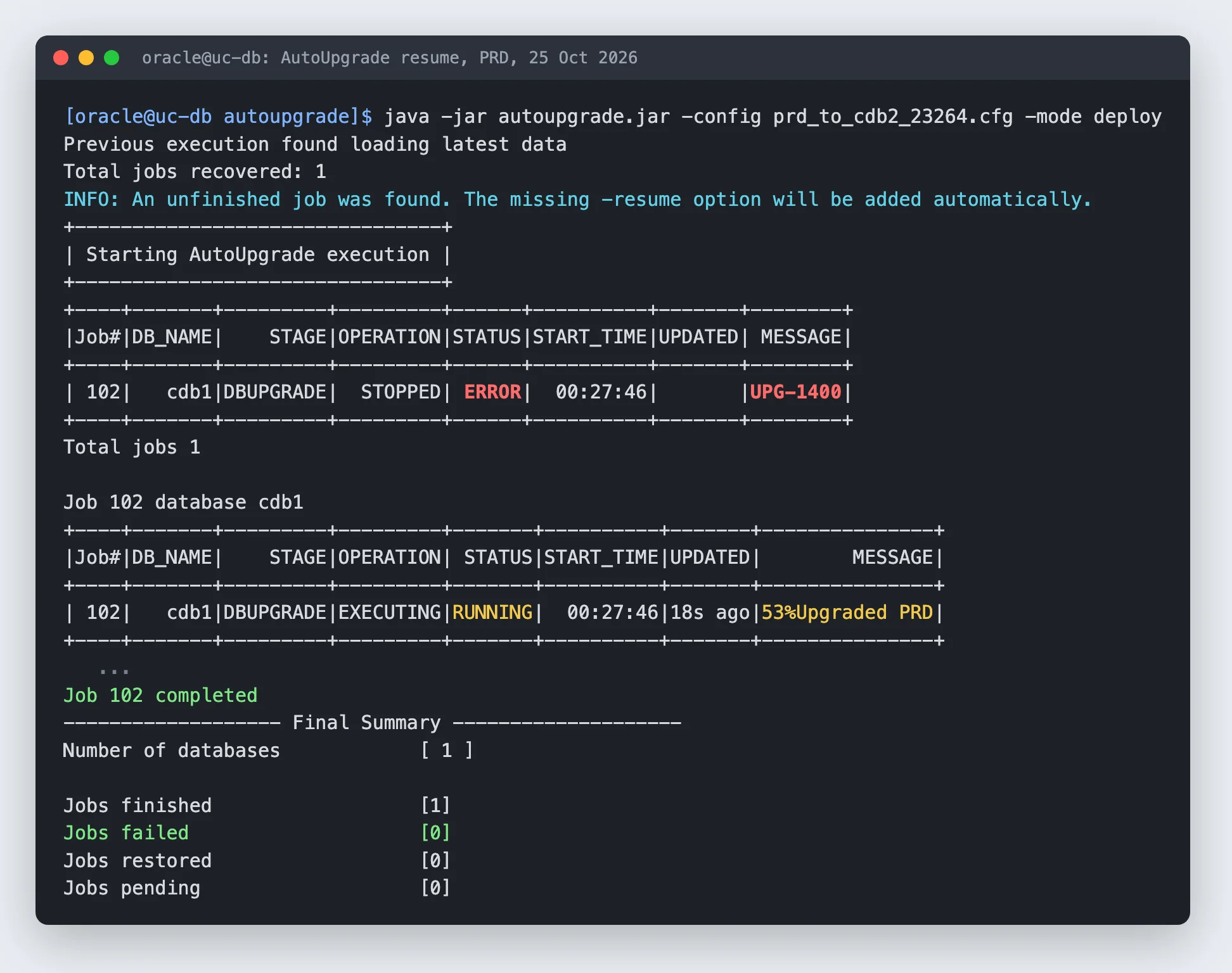
The PRD upgrade stopped halfway with ORA-04031 on the java pool.
Our new CDB was still running with a small SGA, because the 19c CDB was using most of the memory of the server. The plan was to switch the memory after the move. That was a mistake: the upgrade itself needs memory. We did the memory switch right there, set java_pool_size and shared_pool_size explicitly, and restarted the same AutoUpgrade command.
This is something I really like about AutoUpgrade. The upgrade had stopped at 96%, and I ran exactly the same command again. AutoUpgrade saw the unfinished job, added the -resume option itself, continued from 53% (it redoes the phase that failed, not the whole upgrade) and finished 30 minutes later:
Lesson: give the target CDB its final memory before the upgrade, not after.
The Stripe certificate
The next morning our payment code failed. Every call from PL/SQL to api.stripe.com with UTL_HTTP gave ORA-29024: Certificate validation failure.
Same wallet as on 19c, where it worked. We added the exact root and intermediate certificates, it kept failing on 26ai.
In 26ai the database can use the certificates of the operating system, so you don’t need a wallet anymore for public websites. Tim Hall and Connor McDonald wrote about it, and both mention that once you reference a wallet, that wallet wins. So before writing this post I tested it again, in TST, with a simple request to Stripe without an API key (a 401 means the TLS part worked):
| Test | www.oracle.com |
api.stripe.com |
|---|---|---|
| No wallet | ORA-29024 | ORA-29024 |
utl_http.set_wallet('system:') |
HTTP 403, TLS OK | ORA-29024 |
| Our own wallet file | not tested | ORA-29024 |
curl on the same server |
not tested | HTTP 401, TLS OK |
Two things I learned from this:
- “No wallet” didn’t mean “use the operating system” for us. AutoUpgrade had copied the
sqlnet.orasettings of the 19c home into the new home, includingWALLET_LOCATION. So without a wallet in PL/SQL, the database still used our old wallet file. Check thesqlnet.orain your new home after the upgrade. Withsystem:you explicitly ask for the operating system certificates. - Stripe still fails, even with
system:, whilecurlwith the same operating system certificates on the same server works fine. Stripe sends five certificates with two cross-signed paths (to the DigiCert Assured ID Root G2 and the TLS RSA4096 Root G5). I believe the TLS validation in 23.26.4 doesn’t handle that, so this one is for Oracle.
Our workaround: an nginx proxy on our web server that forwards to Stripe and does the TLS validation with the operating system certificates. The database calls the proxy, the proxy calls Stripe. Only the database server is allowed to use it.
If you do the same, a warning: Stripe sends the secret key as the username in Basic authentication. Don’t log $remote_user in nginx, or your secret key ends up in a log file.
We’ll open an SR with Oracle for this. But my advice: test every external HTTPS call your database makes (payment providers, email APIs, AI APIs, webhooks) on 26ai before you move production.
The SQL transpiler
This is the one I was most excited about, and the one that bit us the hardest.
The SQL transpiler turns simple PL/SQL functions that you call inside SQL into plain SQL expressions, so there’s no switch between SQL and PL/SQL anymore. Oracle APEX apps are full of where my_pkg.my_function(x) = ..., so in theory this is free performance. It’s off by default, you switch it on with:
alter system set sql_transpiler = on;We switched it on in DEV, TST and PRD on Sunday evening. Without testing it in DEV first. My decision, and in hindsight not a good one.
36 minutes later the first sessions started crashing with ORA-07445 (a core dump), in PRD. In DEV we saw ORA-06544 errors in the APEX Builder. Every incident had the transpiler in the call stack. One of the queries that crashed the most was the one behind our blog overview page: old SQL with string manipulation on bind variables and replace(:1, ...) in the where clause. Not the most beautiful code in our database, I admit.
Switching it off fixed it immediately, no restart needed:
alter session set container = PRD;
alter system set sql_transpiler=off scope=both;
I believe the transpiler is a great idea, and a crash is a bug on Oracle’s side, so this one goes into an SR too. But it shows the point: features that rewrite your SQL hit your oldest and ugliest code first. Turn them on per session in DEV, run your heavy pages, and only then go further.
Stricter datatypes for bind variables
26ai is stricter about datatypes in CASE expressions. It follows the SQL standard now, and the optimizer can rewrite a simple case x when ... into a searched case when x = .... So a query that compares a VARCHAR2 bind variable with a NUMBER column inside a CASE, which worked fine on 19c thanks to implicit conversion, can now fail with:
ORA-00932: expression (:1) is of data type CHAR, which is incompatible with expected data type NUMBEROracle APEX apps are full of this: page items are strings, and we compare them to numbers and dates all the time without a to_number or to_date. Connor McDonald explains it well in his post on datatype discipline in 26ai, and he also gives the workaround we used, to loosen it again:
alter system set "_fix_control" = '33898336:0' scope = both;See it as a temporary fix, not the solution. The real fix is in your code: convert your page items explicitly to the datatype you compare them with. And because it’s an underscore parameter, check with Oracle Support before you set it in production.
Watch the statistics job
One more, because it can take down your server. On 23.26.4 the statistics gathering (the nightly auto optimizer stats job, but also gather_dictionary_stats) grew a single session to 9.6 GB of PGA. On a 32 GB server that runs into the PGA limit and other sessions get killed with ORA-04036.
Gathering statistics table by table with gather_table_stats was fine. For the automatic job we set a PGA limit for the autotask sessions with Resource Manager (session_pga_limit on the ORA$AUTOTASK consumer group), so if it happens again only that session stops.
So after the upgrade, keep an eye on PGA for a few nights, especially during the maintenance windows.
Was it worth it?
Yes.
We compared the same SQL statements in AWR before and after. 76 statements that ran in both databases used almost an hour (3,520 seconds) less database time over the same hours. The query behind every Oracle APEX page request, route_friendly_url, went from 65 ms to 39 ms, with seven times fewer buffer gets. That’s on one Sunday, so I’ll compare again after a normal working week, but it’s a very good start.
And on 19c we had a PL/SQL JSON memory leak that killed a few sessions a day. Since the move, those JSON leak kills haven’t come back. I’m careful to call that fixed after a few days, but so far so good.
An AI companion
I didn’t do this alone. I had Claude (Claude Code) next to me during the whole project: it read the AutoUpgrade logs, wrote the clean-up scripts, compared the invalid objects, dug through incident traces and found the transpiler in the call stacks at 4 in the morning.
It felt really nice to have an AI companion looking over my shoulder and guiding me. It’s fast, it doesn’t get tired, and it remembers every gotcha from TST when you’re doing PRD.
But in the end, you, the person doing it, are still the one responsible. The AI makes mistakes too. The dictionary statistics run that blew up the PGA was its idea, and in production I ran most of the commands myself, after reading them. So use it, it makes you a lot faster, but know what you do.
My advice
- Use AutoUpgrade, run analyze early and often.
- Go TST, DEV, PRD, and give it a few days between each.
- Clean up first: get to zero invalid objects, so you know what the upgrade broke.
- Keep a way back. For us that was COPY and leaving the 19c files in place.
- Size the memory of the new CDB before the upgrade.
- Test every outgoing HTTPS call from the database.
- Turn on new features one at a time, in DEV first. Yes, I’m talking to myself here.
- Watch the server for a week: alert log, PGA, scheduler jobs that fail.
- Patch every month once you’re on 26ai. AutoUpgrade makes it easy.
We have a much longer runbook for our own setup, with every script and check in it. Most of it is very specific to our environment, so I didn’t put it here. If you’re planning your upgrade and want to compare notes, let me know.
Happy upgrading!
Comments
No comments yet. Be the first.