Archive · 17 April 2015
JSON for APEX Developers (part 3): Querying JSON in Oracle DB 12c
Written 11 years ago. Oracle APEX has moved on a lot since; check the current Oracle APEX posts too.
In previous blog posts I talked about JSON for APEX Developers:
- Generate nested JSON from SQL with ORDS and APEX 5
- JSON for APEX Developers (part 1)
- JSON for APEX Developers (part 2)
In this post I want to show how you store and query JSON data straight in the database.
To start, create a table to store the JSON object:
CREATE TABLE ssn_json
(id NUMBER GENERATED ALWAYS AS IDENTITY NOT NULL,
date_loaded DATE,
json_document CLOB
CONSTRAINT ensure_json CHECK (json_document IS JSON));
I inserted a couple of records in the table:

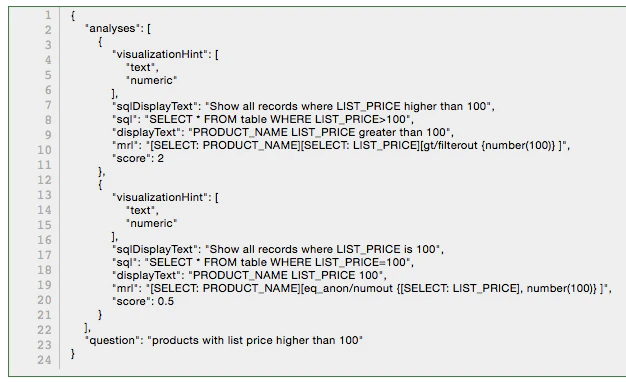
Here’s in more detail the JSON in the json_document column:
Now to query the JSON data I can do :
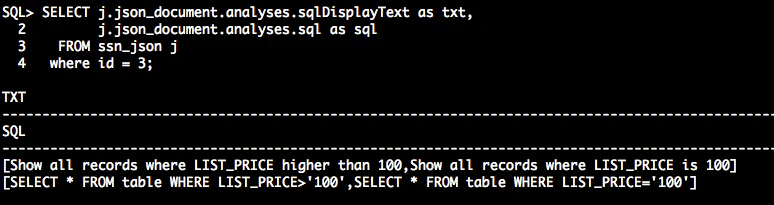
You basically say j (table) . json_document (column) . analyses (first entry in JSON) . … (other fields of the hierarchy you want to navigate to)
You see the data I get back is actually two records as I actually get back the JSON array.
To go into the array and see for example the first record, I can use json_value:
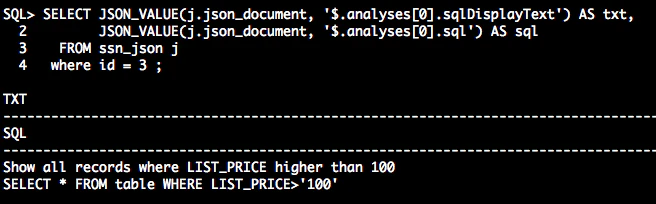
Note that the array start with 0.
And finally to see both records that are in the JSON array I can make use of json_table like this:
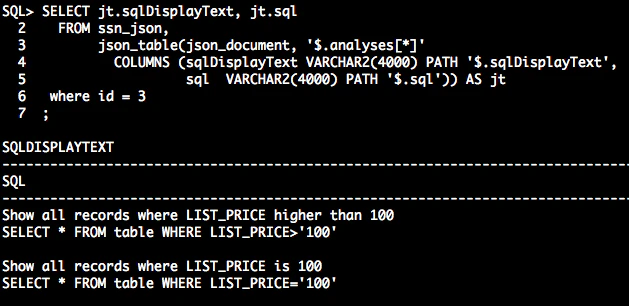
The above is just a grasp of what you can do with JSON directly in the database (12c) by using SQL.
If you’re interested to read more about how to manipulate JSON in the database, have a look at the documentation, it contains a wealth on information with great examples.
As you can basically query the JSON with SQL you can use this SQL in your APEX reports… in the coming days I’ll show you a real case where I used the above techniques to do some interesting searching in data.
Originally published on Blogspot.
Comments
No comments yet. Be the first.