Archive · 22 January 2015
JSON for APEX Developers (part 2)
Written 11 years ago. Oracle APEX has moved on a lot since; check the current Oracle APEX posts too.
In the previous post we created a service that allowed us to give our data in JSON format.
Now let’s focus on consuming that JSON. In this post I want to show how to use JSON data in the client (your browser), in a future post I’ll show how to use JSON on the server (in the database).
If you want to play with JSON, open the console of your browser and create some text in JSON format - easy to do - and use the JSON.parse() function to create an object from it:
var text = ‘{“items”: {“emp”:[{“empno”:7369, “ename”:“SMITH”},{“empno”:7499, “ename”:“ALLEN”} ]}}’;
var obj = JSON.parse(text);
As you will probably do a call somewhere to get JSON, I’ll move on with such an example, so we will call the service we created with ORDS in the previous post and we want to use that data in our APEX page.
So edit your APEX Page in the JavaScript section “Execute when Page Loads” and put
(note you can put your own url that generates the json):
$.getJSON(“https://www.apexrnd.be/ords/training/emp\_json/”, function(json) {
console.log(json);
});
We just called the url from JavaScript and output the result to the console of the browser so we see what we got back:
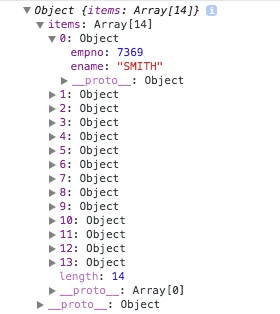
We see the JSON (javascript object/array) we get back from the url. Note that the array starts with 0 (and not 1).
We can now do anything we want with that data. Here we set some items on the page of the first employee:
$(‘#P10_EMPNO’).val(json.items[0].empno);
$(‘#P10_ENAME’).val(json.items[0].ename);
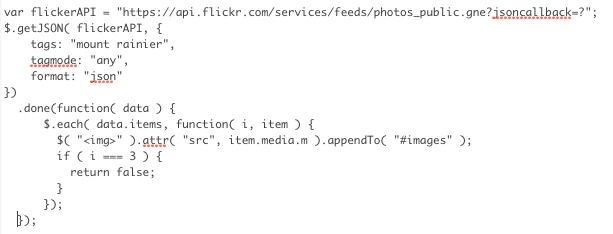
A more interesting example is when you want to integrate Flickr foto’s on your web page.
The concept is the same, call a url, once received loop over the array (see .each) and create an image tag on the fly on your page:
Another example would be when you want to include a visualisation in your page and as data it needs the data in JSON format… You could do that with an AJAX call for example (application process, plugin, …), but that is for another post.
Hopefully this post showed how you can interact with JSON within your APEX page by using JavaScript.
You find the online example at https://www.apexrnd.be/ords/f?p=DGIELIS_BLOG:JSON
Originally published on Blogspot.
Comments
No comments yet. Be the first.