Archive · 22 January 2015
JSON for APEX Developers (part 1)
Written 11 years ago. Oracle APEX has moved on a lot since; check the current Oracle APEX posts too.
After my post Generate nested JSON from SQL with ORDS and APEX 5 I got some requests to explain more about REST and JSON, so let me start with JSON. I’ll go more into REST in some future posts.
JSON stands for JavaScript Object Notation, it’s a text based format to store and transport data.
It all comes from exchanging data, and finding a format that can easily be used by the “client” who needs to do something with the data. In the past XML (and SOAP) was used a lot to fill that need, between tags you found your data. With JSON it’s kinda the same, but because many “clients” are now web pages, it makes sense to use something that is very easy to use by a browser.
Here’s an example of how it was with XML:
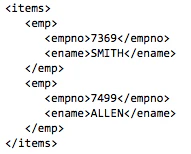
The above XML looks like this in JSON:
{“items”: {
“emp”:[
{“empno”:7369, “ename”:“SMITH”},
{“empno”:7499, “ename”:“ALLEN”}
]}
}
To generate the XML, Oracle build that straight into the database. Here’s a SQL statement that does it for you:
SELECT XMLELEMENT(“items”, XMLAGG(
XMLELEMENT(“emp”,
XMLFOREST(
e.empno AS “empno”,
e.ename AS “ename”)
)
)) AS employees
FROM emp e
To generate the JSON from within the Oracle database takes a bit more effort. You find some nice posts by Morton and Lucas with examples to generate JSON with SQL. If we use the listagg technique our query looks like this:
select ‘{“items”: { “emp”:[’
|| listagg( ‘{ ’
||’ “empno”:“‘||empno||’”’
||‘,“ename”:’||ename
||’} ’, ‘,’) within group (order by 1)
|| ’]} }’as json
from emp
Oracle database 12.1.0.2 has JSON support, but that is more to consume JSON, not to generate. As said in my previous post, APEX 5 has a nice package to generate the JSON or you can use ORDS to generate the JSON.
Let’s look step-by-step how we can generate the JSON by using ORDS.
In APEX, go to SQL Workshop > RESTful Services and hit the CREATE button and fill in the details as below:
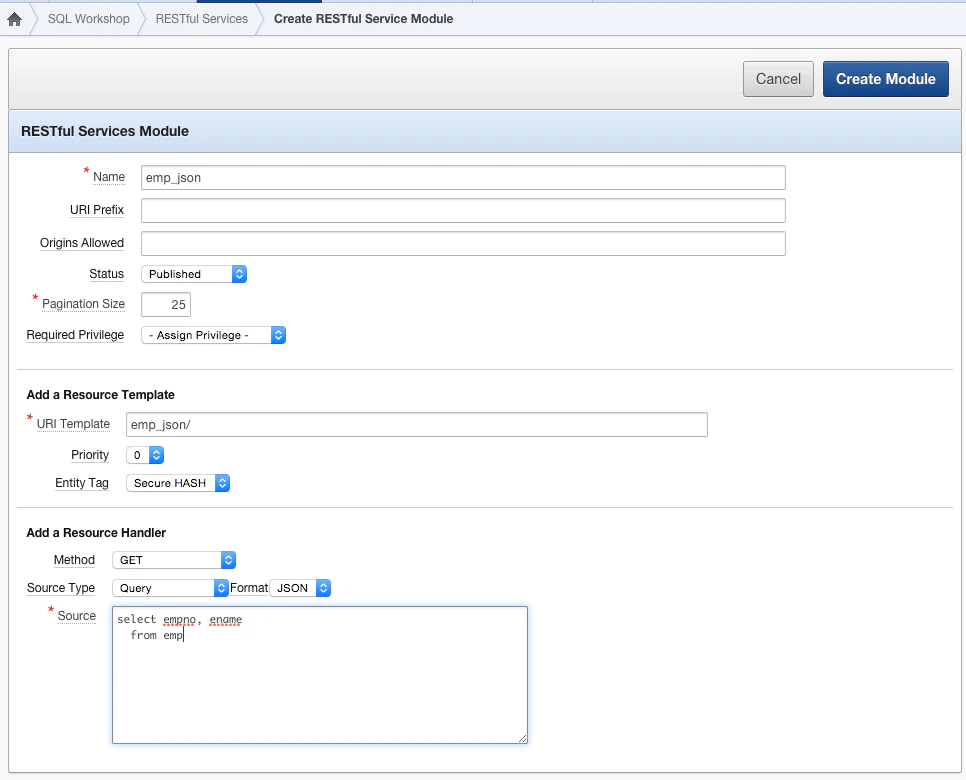
Once you hit Create Module it has generated a REST Webservice, but more important for this post is that you have now a url that you can provide to somebody to get the data in JSON format:
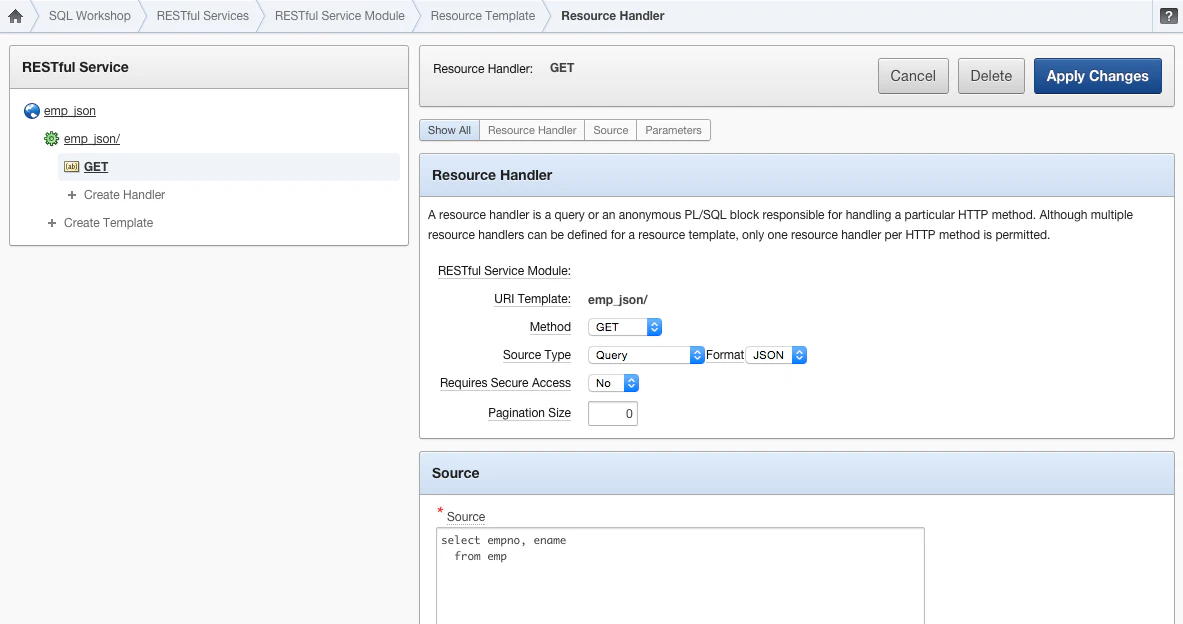
There are many options for this service, but if you don’t want Pagination, put a 0 in Pagination Size and if you don’t run in HTTPS, put a No in Require Secure Access.
By running the url https://www.apexrnd.be/ords/training/emp_json/ we now see our data in JSON.
In the next post we will consume that data in our web page.
Originally published on Blogspot.
Comments
No comments yet. Be the first.