Archive · 27 September 2015
Custom image on your APEX app login page
Written 11 years ago. Oracle APEX has moved on a lot since; check the current Oracle APEX posts too.
In a comment on my post APEX 5.0: pimping the Login page I got a question how to put your own logo or a custom image on the login page, instead of an icon.
You only need a bit of CSS to do the trick:
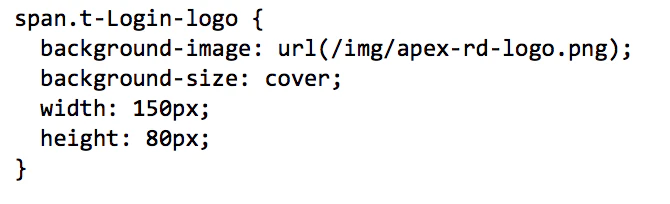
You can add the above CSS to your login page - Inline CSS in page attributes or you can add it to your page template or custom CSS in Universal Theme.
The result is this:

To differentiate the login page you can do a lot more, here’re some things we show during our APEX UI training:
- add transparency to the login box
- add a background image to your entire page (blurred or not)
Again, you can do that with just some CSS.
Update (feedback from Daniel Javer); if you are on mobile you can use in CSS of your page:
body {
  webkit-background-size: cover;
    -moz-background-size: cover;
    -o-background-size: cover;
    background-size: cover;
    background-image:url('#APP_IMAGES#upbase/pic.jpg');
  }
  .ui-content.ui-body-a{
    background: rgba(0, 0, 0, 0.1);
  }
  .ui-responsive-panel.ui-page.ui-page-theme-a.ui-page-active{
    background: rgba(0, 0, 0, 0.1);
  }
Originally published on Blogspot.
Comments
No comments yet. Be the first.