Archive · 8 December 2017
Reverse engineer existing Oracle tables to Quick SQL
Written 9 years ago. Oracle APEX has moved on a lot since; check the current Oracle APEX posts too.

If you didn’t hear about Oracle Quick SQL, it’s time to read about it as it’s something you have without knowing (it’s a packaged app in Oracle APEX) and I believe you should start using :)
Quick SQL enables you to rapidly design and prototype data models using a markdown-like shorthand syntax that expands to standards-based Oracle SQL. You can easily create master detail relationships, check constraints, and even generate sample data.
In my blog post Create the Oracle database objects I go over the history how I created database objects and why I think Quick SQL is great and why I use it.
I guess most people typically use Quick SQL at the start of a new project, as it’s the quickest way to create your data model and Oracle database objects. That is my primary use case too, but I started to use Quick SQL even on projects where database objects already exist.
In the project I’m currently involved in, the datamodel was generated by another tool, but as we iterate through the project, tables change, columns get renamed and added, row version were requested, triggers need to be made Oracle APEX aware…
Now we could do those changes manually, but I thought it made much more sense to create the data model in Quick SQL and use the features that come with Quick SQL. By clicking a checkbox we can include a Row version, Quick SQL generates the triggers automatically in an APEX aware form, we can generate as much sample data as we want by adding /insert and we can use all the other features that come with Quick SQL. For example when you want to include a history table in the future it’s just another checkbox to click.
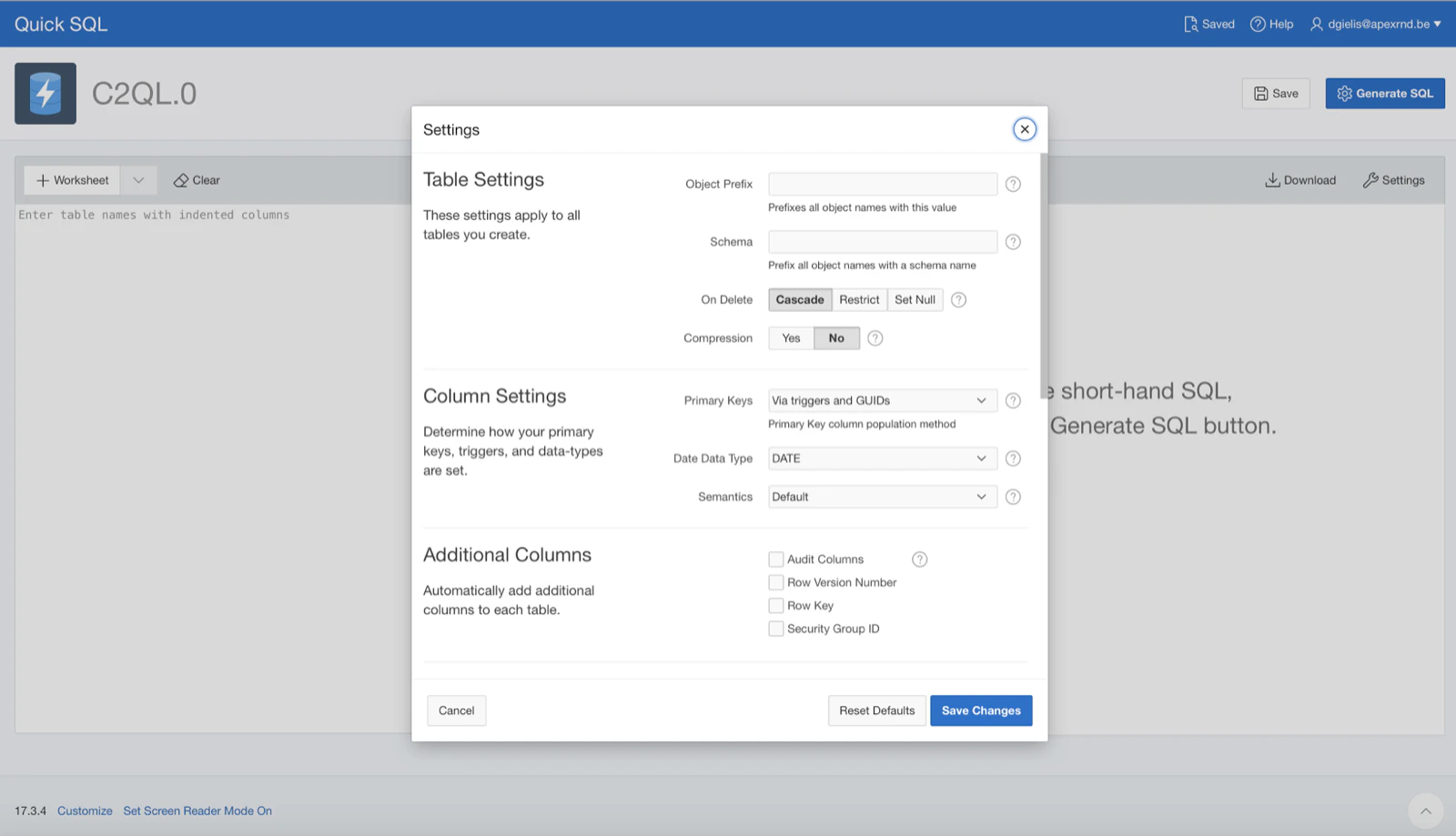
It’s also easy to check-in the Quick SQL script into source control, together with the generated DDL.
If changes need to be done, we can adapt in Quick SQL and generate the DDL again and we see the changes immediately. It would be nice if Quick SQL could generate the ALTER statements too, but that’s not the case yet. But it’s easy enough to see the changes that were done by comparing the scripts in source control.
If you also want to reverse engineer an existing model into Quick SQL, here’s a script that gives you a head start generating the markdown style format.
declare
  l_prefix varchar2(15) := 'EBA_DBTOOLS';
  l_spaces varchar2(10) := '  '; -- use ' ' in web
  l_enter  varchar2(10) := CHR(10); -- use '<br/>' in web
  l_constraint varchar2(500);
begin
  for t in (select t.table_name,
                   case when m.comments is not null then ' [' || replace(replace(replace(m.comments,'[','{'),']','}'),CHR(10)) ||']' end as comments
              from user_tables t, user_tab_comments m,
                   (select max(lvl) as lvl, table_name
                      from
                      (select level as lvl, table_name, rpad('_', (level-1)*2, '_') || table_name as tbl
                        from (
                          select a.table_name, a.constraint_name pkey_constraint, b.constraint_name fkey_constraint, b.r_constraint_name
                            from user_constraints a, user_constraints b
                          where a.table_name = b.table_name (+)
                            and a.constraint_type = 'P'
                            and b.constraint_type (+) = 'R'
                            and a.table_name like l_prefix || '%'
                        )
                        start with fkey_constraint is null
                        connect by prior pkey_constraint = r_constraint_name
                      )
                     group by table_name
                   ) o
             where t.table_name = m.table_name (+)
               and t.table_name = o.table_name (+)
               and t.table_name like l_prefix || '%'
             order by o.lvl, t.table_name
           )
  loop
    sys.htp.prn(l_enter || l_enter || lower(replace(t.table_name,l_prefix||'_')) || t.comments );
    for c in (select c.column_name, c.data_type, c.data_length, c.data_precision, c.data_scale,
                     c.nullable, c.default_length, c.data_default,
                     case when to_char(c.data_length) is not null and (c.data_type = 'NUMBER')
                          then c.data_type || '(' || to_char(c.data_length) || ',' || nvl(c.data_precision,0) ||')'
                          when c.data_type in ('BLOB','CLOB','DATE')
                          then c.data_type
                          when to_char(c.data_length) is not null
                          then c.data_type || '(' || to_char(c.data_length) ||')'
                          else c.data_type
                     end as data_type_length,
                     case when m.comments is not null then ' [' || replace(replace(replace(m.comments,'[','{'),']','}'),CHR(10))  ||']' end as comments
                from user_tab_columns c, user_col_comments m
               where c.table_name = t.table_name
                 and c.column_name not in ('ID', 'CREATED_BY', 'CREATION_DATE', 'UPDATED_BY', 'UPDATE_DATE')
                 and c.table_name = m.table_name (+)
                 and c.column_name = m.column_name (+)
               order by c.column_id
             )
    loop
      l_constraint := '';
      for u in (select b.table_name, b.column_name, a.constraint_type, a.search_condition,
                       replace(a.r_constraint_name,'_PK') as r_constraint_name,
                       (select replace(i.table_name,l_prefix||'_','') from user_constraints i where i.constraint_name = a.r_constraint_name) as pk_table_name
                  from user_constraints a, user_cons_columns b
                 where a.constraint_name = b.constraint_name
                   and b.table_name = t.table_name
                   and b.column_name = c.column_name
                   and a.constraint_type in ('U','R','C')
               )
      loop
        if u.constraint_type = 'U'
        then
          l_constraint := l_constraint || ' /unique';
        elsif u.constraint_type = 'R'
        then
          l_constraint := l_constraint || ' /fk ' || u.pk_table_name;
        elsif u.constraint_type = 'C' and u.search_condition like '%NOT NULL%'
        then
          l_constraint := l_constraint || ' /nn';
        elsif u.constraint_type = 'C'
        then
          l_constraint := l_constraint || ' /check ' || replace(substr(replace(replace(replace(u.search_condition,CHR(10),' '),CHR(13),' '),'  ', ' '),instr(replace(replace(replace(u.search_condition,CHR(10),' '),CHR(13),' '),'  ', ' '),'(')+1),')','');
        end if;
      end loop;
      sys.htp.prn(l_enter || l_spaces || rpad(lower(c.column_name),30, ' ') || ' ' || lower(c.data_type_length) || ' ' || l_constraint || c.comments);
    end loop;
  end loop;
end;
I tried the script on the Quick SQL data model itself - the result you see below:
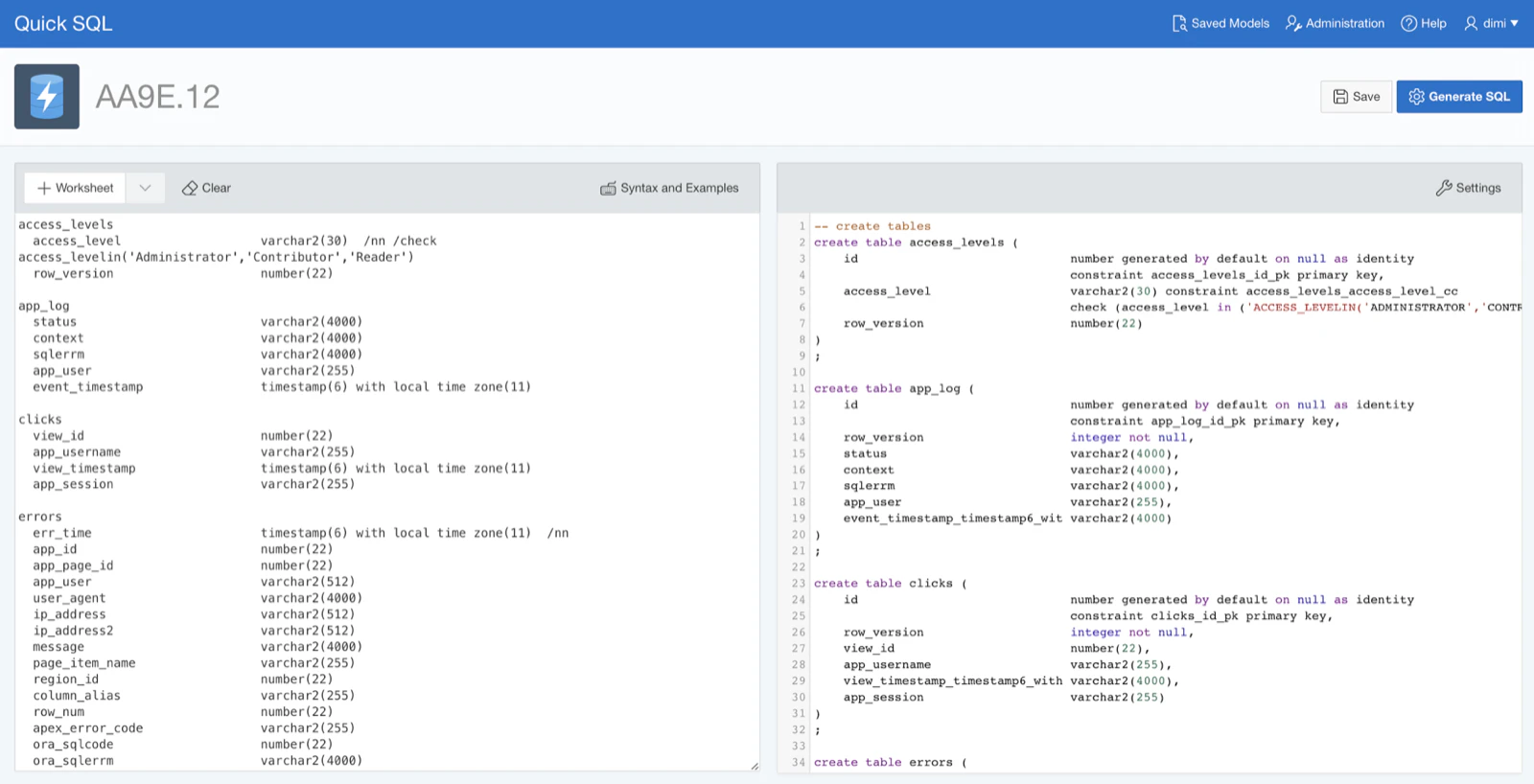
Hopefully you see the benefit of using Quick SQL in existing projects too and the script helps you get there. Also Quick SQL gets frequent updates - in the upcoming release (17.3.4), which is already online, you can add a Security Group ID to every table (to make your app multi-tenant) and you can rename the audit columns to your own naming conventions.
Originally published on Blogspot.
Comments
No comments yet. Be the first.