Archive · 7 August 2017
List of the tools I use and why I use them
Written 9 years ago. Oracle APEX has moved on a lot since; check the current Oracle APEX posts too.
This post is part of a series of posts: From idea to app or how I do an Oracle APEX project anno 2017
I initially thought to only list the software tools I use, but tools are more than software alone. As a developer I find it important you have everything you need to be successful. For me that means a clean desk, a whiteboard, paper and some writing material (as explained in my previous post) and top notch hardware. Here’s a picture of my desk:
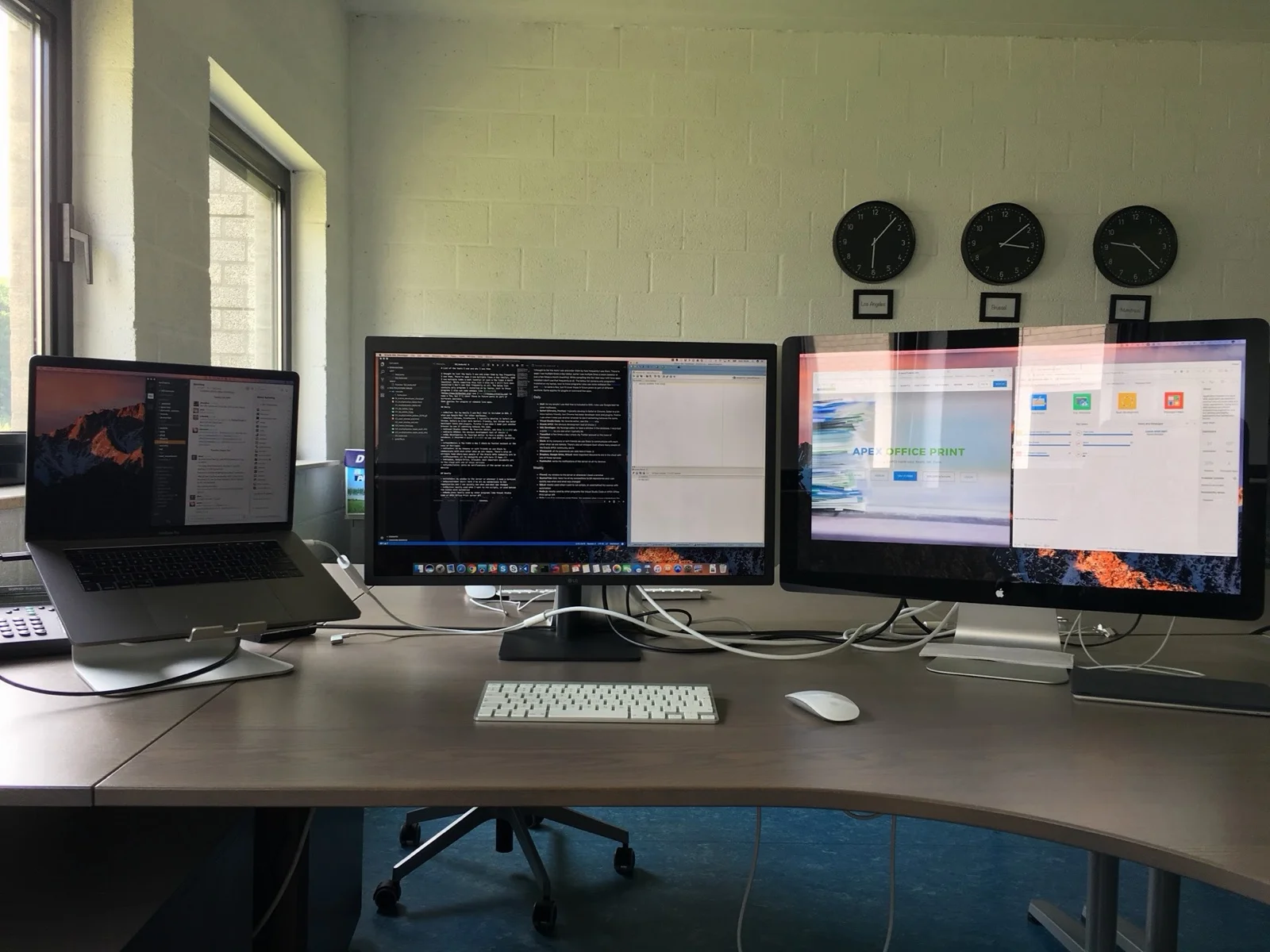
So lets move on to the software part now, but before reading further, lets start with a quote I came up with ;)
The tools don’t make the developer - Dimitri Gielis
or another quote I like a lot, sent in by Alan Rintoul:
The single most important component of a camera is the twelve inches behind it – Ansel Adams
When doing development, it’s not about the tools, it’s about mindset. Tools can help achieve a goal, but which tool to use depends on you and how you work with them. I love to hear what and how other people are using tools to get the job done. Martin D’Souza showed in this podcast how he works with Atom (text editor) and why you should use it. I loved the podcast, Martin is a very smart guy and good developer, but you can look at this podcast in two different ways. You can look at it and say, I’m going to use Atom now, and work with Atom the same as you did in Notepad, or you can look at the principles he explains why he went with Atom and apply it to your editor of choice (which might be Atom, Sublime or another). I recently switched to Visual Studio Code as my main editor, because for me it worked better in the job I have to do a lot (read large JSON files, work with Markdown and Git). Does it mean everybody should switch? Not at all, whatever works for you.
So having said that, I thought it would be nice to list the (software) tools I use and order them by how frequently I use them. There’re apps I use multiple times a day (daily), some I use multiple times a week (weekly) or just a few times a month (monthly). While compiling this list I also saw I still have apps installed I don’t use that frequently at all. The below list contains only desktop applications I installed on my laptop, next to those programs I also use some webapps like Bitbucket and Trello to name a few, but I’ll cover those in future posts as part of different sections. Same applies for plugins or command line apps.
Note: I’ve a Mac laptop with macOS, so the below applications might not exist for Windows.
Daily
- Mail: for my emails I use Mail that is included in OSX. I also use Google Mail for other mailboxes.
- Safari (Chrome, Firefox): I typically develop in Safari or Chrome. Safari is a bit more battery friendly, but Chrome has beter developer tools and plugins. Firefox I use when I need just another browser to see if something behaves the same.
- Visual Studio Code: My favorite editor, I plan to do a quick video how I work with Visual Studio Code and will update this post when done placeholder for video
- Oracle APEX: the obvious development tool of choice :) (technically not a desktop app, but belongs here anyway)
- SQL Developer: My favorite editor to have a window in my Oracle databases. I plan to record a quick video how I work with SQL Developer and will update this post when done placeholder for video
- TweetBot: a few times a day I check my Twitter account or the news of #orclapex
- Slack: at my company or with friends we use Slack to communicate with each other when we are remote. There’s also an orclapex team where many people of the Oracle APEX community are in
- 1Password: with this little tool I can have all different and secure passwords, accessible with a click
- Dropbox, Google Drive, iCloud: most important documents are in the cloud with one of those services
- Pushbullet: sents me notifications of the server on all my devices
Weekly
- iTerm2: my window to the server or whenever I need a terminal
- SourceTree (Git): here I’ve all my connections to Git repositories and I can quickly see when and what was changed
- SQLcl: mostly used when I want to run scripts, or used behind the scenes with automation
- Node.js: mostly used by other programs like Visual Studio Code or APEX Office Print during development
- Gulp: I use it to automate some things, for example when I save a Markdown file in Visual Studio Code it will automatically build an html file for me
- VMware: when I need to have a Windows machine or want to test something in my OXAR VM
- MS Office 365: Word, Excel, Powerpoint: I use to create or edit documents for example with track changes or I’m using it to create templates for APEX Office Print
- GotoMeeting, Skype, Zoom, Webex, TeamViewer, Google: when connecting to customers, friends, we use any of those meeting tools
- Moom: a little window manager for OSX, which allows me to quickly see two windows next to each other
Monthly
- Keynote: to build or deliver my presentations
- Docker: to quickly get a test system or software up and running
- LICEcap: to create animated gifs
- Screenflow: to create videos
- Transmit: to transfer files to another system
Installed, but not using that often
- TextExpander: snippets manager, this one I actually plan to use more
- XCode: used when building native iOS apps or compiling Cordova apps
- VirtualBox: when testing Oracle Developer VMs
- Paw: a REST manager, but I’m using Visual Studio Code plugin for that now
- The Unarchiver: when getting files from customers to unpack them
- Letter Opener for macOS Mail: some people send windows mails, without this tool I can’t read it on OSX
- Duet: enables my iPad as second screen, only used when travelling
- Kaleidoscope: to compare two files (if they are not in Git)
- Classeur: used when writing in Markdown for my Blog, but replaced it with Visual Studio Code
- BBEdit, Atom, Sublime Text: replaced with Visual Studio Code
- OmniPlan: used for planning
- Patterns: to try regular expressions
- MacDown: used to create Markdown files, for example most of the AOP documentation was written in here, but using Visual Studio Code now
- LibreOffice: used in combination with AOP
- Pages, Numbers: to exchange or read older files I wrote in Pages or Numbers
- MJML: to write responsive emails
The above are just some tools that help me doing my job. Over time I changed tools and will most likely use others in the future. So depending when you read this (after 2017) things might have changed.
Feel free to share your favorite tools in the comments section.
Originally published on Blogspot.
Comments
No comments yet. Be the first.