Archive · 3 February 2012
Querying EBS data from APEX using Views
Written 14 years ago. Oracle APEX has moved on a lot since; check the current Oracle APEX posts too.

Integrating APEX and EBS by using views is one of the easiest solutions (at first sight!).
This is the first scenario, where I have an APEX application and I want to integrate with data sitting in EBS.
Pre-requisites:
- APEX is installed in the same database as EBS (see previous post).
- My APEX application (actually Workspace) is linked to my own (non-EBS) Oracle schema.
If you want to view data coming from EBS in your APEX application, follow these steps:
-
Identify where the data is in EBS
If you are not familiar with the data model of EBS, it can be hard to find the right information. A good starting point would be the APPS schema, because that has access to the complete Oracle E-Business Suite data model. You can compare it with the SYSTEM schema, which has access to the entire database.
This pictures shows an overview of the APPS schema and base product schemas.
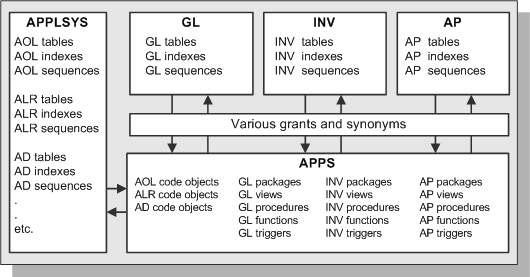
You can read more about the APPS schema in the EBS documentation.
In my example I wanted to find the people that are in my organisation (HR). I started to look for views that would give me that information. My first query was like this:
select object_name
from user_objects
where object_name like ‘%PEOPLE%’
and object_type = ‘VIEW’
order by 1That query returned 82 rows in my environment. In the results I saw e.g. ADS_PEOPLE_V, HRBG_PEOPLE, PER_ALL_PEOPLE, PER_PEOPLE, PER_PEOPLE_F etc.
I started to look at the definitions of those, but if you are not familiar with EBS it’s hard to know which one is the one you need. So my recommendation would definitely be; when you are not that familiar with EBS, talk with somebody who knows more about it. For me that is the case, I only started to look into EBS and actually do something with it, a few weeks ago.
When I talked to somebody more experienced in EBS, he told me I probably wanted to look at PER_ALL_PEOPLE_F. Hmm, that wasn’t in the result set of the above query. After investigating a bit more PER_ALL_PEOPLE_F is a synonym for HR.PER_ALL_PEOPLE_F.
I wanted to understand the naming convention in EBS a bit better e.g. for the PER%PEOPLE% objects.
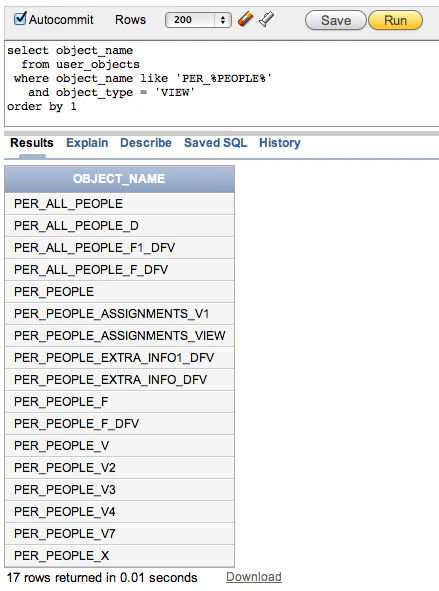
Below I created a table how I interpret the EBS objects:
View / Synonym (^) count(*) count(distinct person_id) Interpretation per_all_people_f (^) 32295 18518 Synonym to real HR table per_all_people 0 0 Needs EBS session (record in FND_SESSIONS) so it knows what you can see per_all_people_d 32295 18518 All records but shows translated text if user settings are applied per_people 0 0 Needs EBS session, shows effective records based on user's date per_people_f 32295 18518 EBS security implemented, you only see records you are allowed to see per_people_v 0 0 Needs EBS Session, includes a lot of display text and is language dependend per_people_x 18518 18518 EBS security implemented (same as per_people_f), but limits to only the effective records
(WHERE TRUNC(SYSDATE) BETWEEN EFFECTIVE_START_DATE AND EFFECTIVE_END_DATE)So to me PER_PEOPLE_X looks like a good candidate to use in my APEX application. If I’m not logged into the app as an E-Business user I still see all records that are effective at the time I run the query.
-
Create a view on top of the EBS views and use some naming conventions so it’s easy to recognise which objects you created and are not native EBS ones.
create view apex_per_people_vw as select * from per_people_x
-
Grant access on that view to the schema that is linked to your APEX workspace and application
grant select on apex_per_people_vw to apex_ebs
-
Create a view in your own schema that selects everything from the view in the apps schema.
We do that so that the views are a one-on-one mapping between schema’s, but they show up in the APEX wizards.create view apex_per_people_vw as select * from apps.apex_per_people_vw
-
Create an Interactive Report on top of the view
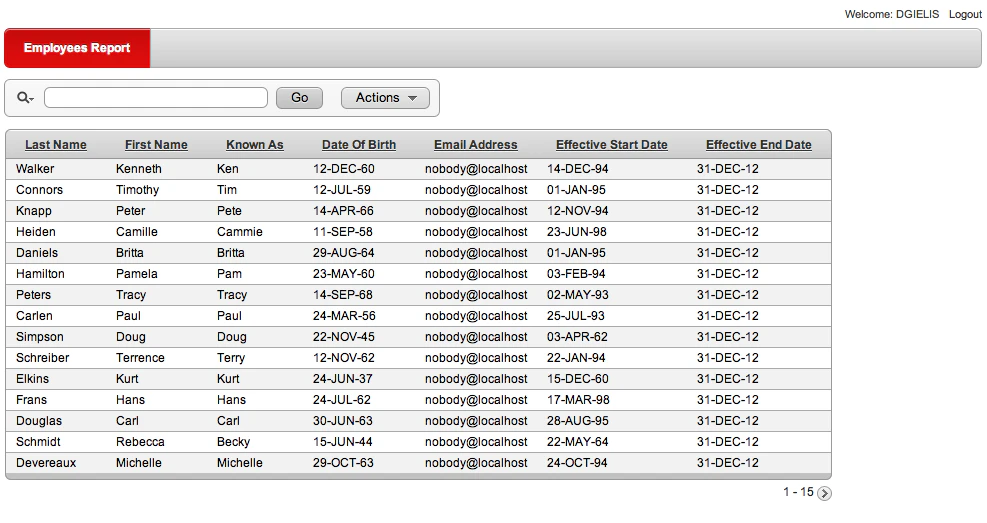
This first examples shows how you can view data from EBS in your own APEX application. We can now create a calendar, charts etc. in APEX based on the data coming from EBS. In the next post I will show how you can edit this data.
Previous related posts:
Originally published on Blogspot.
Comments
No comments yet. Be the first.