Archive · 13 August 2009
Using Keystrokes in a Web Application
Written 17 years ago. Oracle APEX has moved on a lot since; check the current Oracle APEX posts too.
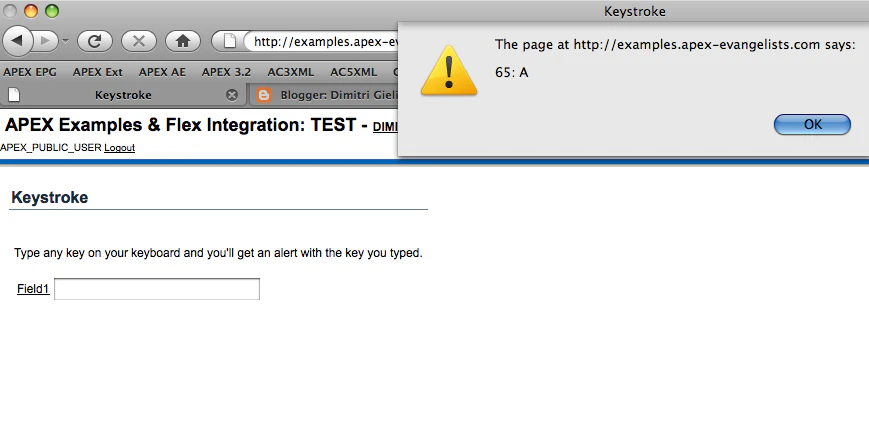
There was an interesting question in the APEX Forum of somebody wanting to use the keyboard to control the screen.
Controlling your screen with the keyboard is a challenge when you are in a web environment as you can be on different platforms and have different browsers that are not always acting the same way.
I created a quick APEX page (site no longer online) and included some javascript to enable that page to know what keys are typed from the keyboard. During testing I thought about what would happen with a text item and you want to type something in there… you don’t want that something happens then (e.g. submitting the page when you hit S). Luckily in javascript you can control that as well.
<script type="text/javascript">function checkKeyPress(evt) { // get events var evt = (evt) ? evt : ((event) ? event : null); if (!evt) return true; // get where you are on the page var node = (evt.target) ? evt.target : ((evt.srcElement) ? evt.srcElement : null); // if you are in a text item show this alert otherwise another if (node.type == "text") alert('in item:' + evt.keyCode + ': ' + String.fromCharCode(evt.keyCode)); else alert(evt.keyCode + ': ' + String.fromCharCode(evt.keyCode));}// on every Key Down, run the function to check which key was hitdocument.onkeydown = checkKeyPress;</script>Originally published on Blogspot.
Comments
No comments yet. Be the first.