Archive · 10 February 2009
Some date related tips to remember
Written 17 years ago. Oracle APEX has moved on a lot since; check the current Oracle APEX posts too.
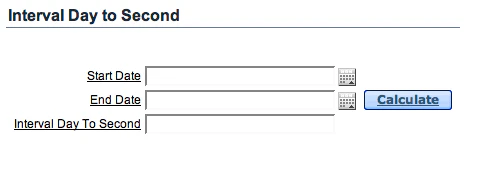
The function INTERVAL DAY TO SECOND already exists from 9i, but I didn’t use it that much before.
An Oracle By Example goes into more detail.
In APEX I created a quick example (site no longer online) to show you how you can calculate the difference for dates. Behind the Calculate button I call a Process with this logic:
:P28_INTERVAL_DAY_TO_SECOND := CAST ( TO_DATE(:P28_end_date,'DD-MON-YYYY HH24:MI') AS TIMESTAMP WITH TIME ZONE )- CAST ( TO_DATE(:P28_start_date,'DD-MON-YYYY HH24:MI') AS TIMESTAMP WITH TIME ZONE );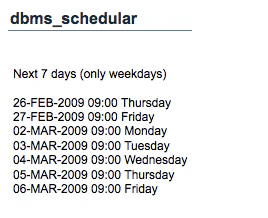
If you are looking for recurrent events (repeating intervals) you can use dbms_scheduler. In the early years of HTMLDB I created an APEX app called Agendimi which was basically an “online Outlook” for teachers. I wish I had the dbms_scheduler package to my disposal at that time!
Here’s an example (found here, but adapted for APEX) to get the next 7 days (a plsql region in Apex on the same example page as above:
DECLAREstart_date TIMESTAMP;return_date_after TIMESTAMP;next_run_date TIMESTAMP;BEGINstart_date := CAST ( TO_DATE(:P28_start_date,'DD-MON-YYYY HH24:MI') AS TIMESTAMP WITH TIME ZONE );htp.p('Next 7 days (only weekdays)');return_date_after := start_date;FOR i IN 1..7LOOP dbms_scheduler.evaluate_calendar_string('FREQ=DAILY;BYHOUR=9;BYMINUTE=0;BYDAY=MON,TUE,WED,THU,FRI', start_date, return_date_after, next_run_date); htp.p(TO_CHAR(next_run_date,'DD-MON-YYYY HH24:MI Day')); return_date_after := next_run_date;END LOOP;END;Another nice one FM… I needed a date format like 1.1.2009, so I thought d.m.yyyy, but I couldn’t put that into Oracle. Try: select to_char(sysdate,‘d.m.yyyy’) from dual; You’ll get a nice ORA-01821 date format not recognised. So how do you get that format then?
You need to put FM in front of your date format:
select to_char(sysdate,'FMdd.mm.yyyy') from dual;Originally published on Blogspot.
Comments
No comments yet. Be the first.