Archive · 14 January 2008
My Top 15 Oracle DB 11g NF for APEX Developers: 15
Written 18 years ago. Oracle APEX has moved on a lot since; check the current Oracle APEX posts too.
I thought it a good idea to write a series of blog posts about some new features of the Oracle 11g database I find useful in an APEX project.
I decided to do a “Top 15”. It’s very difficult to order them, as for one person or project a feature would be number 1, but for another, it would only be found on place 10. So don’t see it as I like the feature I put on place 15 less than the one on place 10. I like all new features ;-)
My research… this top 15 came together after reading:
- The Oracle 11g Database New Features Guide
- Oracle Database 11g: The Top New Features for DBAs and Developers by Arup Nanda
- Tim Hall’s articles on Oracle Database 11g
- and Tom Kyte’s Top 11 things about 11g.
That was the background…
15 - Virtual Columns
Why would you like to use this feature?
If you’ve an orders table with the unit price and the quantity, wouldn’t it be useful to have the total (= unit price * quantity)?
Or when a store has a price list of items they buy, they add 30% to it to get the price they sell the item too. Or getting the initials of a name. Or seeing the date in a specific format. Or… Having that kind of information already in the table may be of help.
What does Oracle say about it?
Virtual columns enable application developers to define computations and transformations as the column (metadata) definition of tables without space consumption. This makes application development easier and less error-prone, as well as enhances query optimization by providing additional statistics to the optimizer for these virtual columns.
Syntax
Part of the create/alter table statement:
column [datatype] [GENERATED ALWAYS] AS (column_expression) [VIRTUAL] [ inline_constraint [inline_constraint]... ]Example
SQL> CREATE TABLE EMP_WITH_VC (EMPNO NUMBER(4,0) NOT NULL ENABLE,ENAME VARCHAR2(10 BYTE),JOB VARCHAR2(9 BYTE),MGR NUMBER(4,0),HIREDATE DATE,SAL NUMBER(7,2),COMM NUMBER(7,2),DEPTNO NUMBER(2,0),NEW_SAL AS (ROUND(sal*1.10,2)),TOTAL_SAL_COMM NUMBER GENERATED ALWAYS AS (ROUND(sal*1.10+NVL(comm,0),2)) VIRTUAL,HIRE_YEAR AS (TO_CHAR(hiredate, 'YYYY')),PRIMARY KEY (EMPNO));SQL> INSERT INTO EMP_WITH_VC (empno, ename, job, mgr, hiredate, sal, comm, deptno)SELECT empno, ename, job, mgr, hiredate, sal, comm, deptno FROM EMP; If we query the new EMP with Virtual Column table, we’ll see all data of the normal EMP table + the new virtual columns (red): the new salary (10% higher), the total package of the salary and commission and the hire year.
SQL> SELECT * FROM EMP_WITH_VC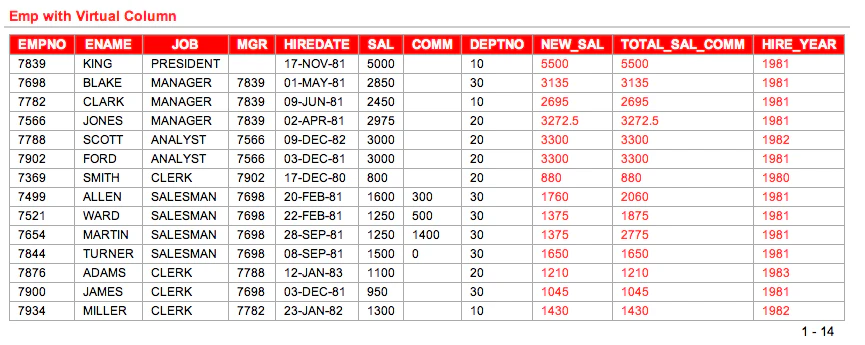
I wanted to put the examples online on the new APEX 3.1 instance, but it doesn’t seem to run on 11g… (as my creation of my table failed). But as you see on the screenshot, it’s running on my local machines.
Behind the Scenes
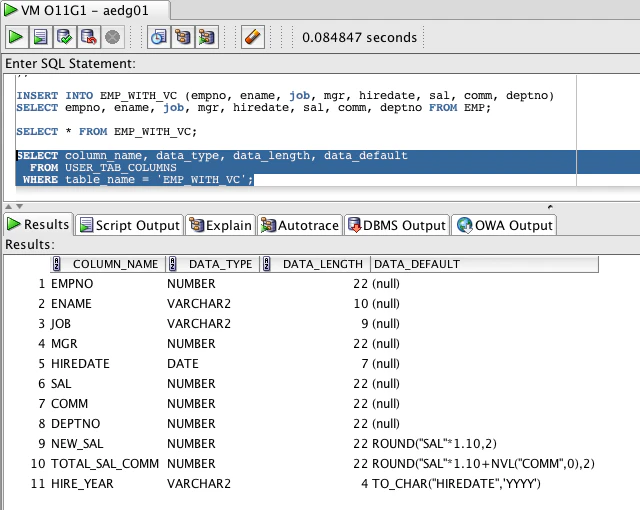
If you look at the user_tab_columns view you’ll notice a column called data_default, which contains the expression of the virtual column.
Other useful information
-
An index can be created on a Virtual Column (this would be a function based index)
-
You can not do DML (insert, update, delete) on a Virtual Column, but you can use it in a WHERE clause
-
Virtual Columns are only available on relational heap tables
-
Virtual Column expression work only on the same table, so not cross table and they can’t contain other Virtual Columns
-
You can use Vitual Columns in Constraints (PK, FK, Check)
-
You can partition on Virtual Columns !
The full documentation about Virtual Columns can be found here.
Originally published on Blogspot.
Comments
No comments yet. Be the first.