Archive · 29 July 2007
Oracle APEX: onload in Page HTML Body Attribute
Written 19 years ago. Oracle APEX has moved on a lot since; check the current Oracle APEX posts too.
Did you already try to put an onload javascript event in the HTML body of your page in APEX?
You may want to do that to run some initial javascript when your page loads.
For ex. in DG Tournament (site no longer online) I use the onload event to enable Google Suggest.
In Oracle Application Express you put the onload event in the HTML Body Attribute section
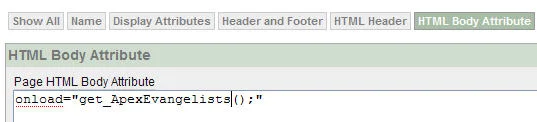
If you would look in the source of your HTML page you would see something like:
<body onload="get_ApexEvangelists();">However, when you try to put the above code as HTML Body Attribute, you may get the error “You may not declaratively set cursor focus if you specify an ONLOAD in this attribute.”
The complete message:

You should always read the messages ;-) But I noticed (also with myself) that you check quickly your code to see what you did wrong. However it has nothing to do with your code…
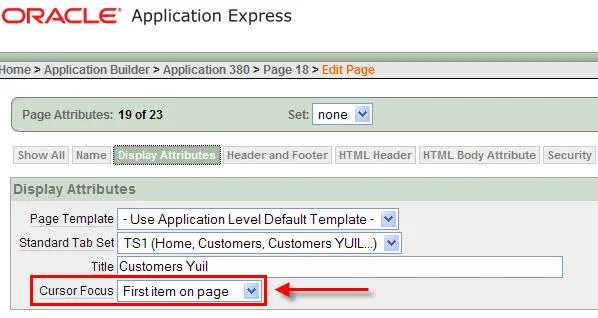
You can fix this error by go to the Display Attributes of your Page and set the Cursor Focus to “Do not focus cursor” instead of that APEX puts the focus to the first item of the page.
People seeing this message by “Googling” the error, didn’t read neither ;-)
Originally published on Blogspot.
Comments
No comments yet. Be the first.